

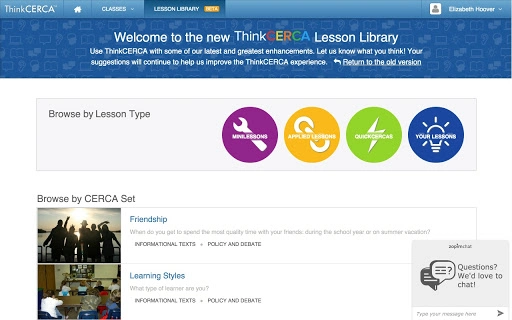
Description
Download ThinkCERCA – Literacy Platform for Grades 4-12
Overview
ThinkCERCA is a comprehensive literacy platform designed to empower educators in grades 4 through 12 with tools to foster critical thinking and analytical skills across academic subjects. Built around the evidence-based CERCA Framework—Claims, Evidence, Reasoning, Counterarguments, and Audience—the platform supports close reading and academic writing instruction in English language arts, science, social studies, and math. It enables teachers to differentiate instruction for diverse learners through a library of standards-aligned lessons, real-world texts, and interactive assessments. The program’s schoolwide approach promotes consistent literacy development by giving students, teachers, parents, and administrators a shared language for academic growth. ThinkCERCA integrates seamlessly with Google Workspace for Education, supporting workflows in Google Classroom, Google Docs, Google Sheets, and other core tools. Real-world applications include classroom instruction, remote learning, and targeted intervention programs. The developer did not provide additional details about the organization’s background or history. Platform compatibility information is limited to the listed operating systems and device types.
Key Features & Capabilities
- Standards-Aligned Lessons – Offers a curated library of close reading and writing lessons aligned with Common Core State Standards, supporting curriculum integration across multiple subjects.
- CERCA Framework Integration – Provides a structured method for students to develop argumentation skills by constructing claims supported by evidence, explaining reasoning, addressing counterarguments, and tailoring writing to an audience.
- Multiple Lesson Types – Includes Independent Reading, Direct Instruction, and Applied Close Reading and Writing lessons to support varied instructional needs and learning paces.
- Text and Writing Support Tools – Features authentic informational and literary texts with in-text vocabulary support, audio assistance, and a scaffolded Argument Builder to guide students through writing development.
- Assessment and Feedback – Offers automated and constructed response assessments to monitor student progress and inform instruction, with immediate feedback mechanisms for learners.
- Collaborative Learning Design – Encourages classroom discussion, debate, and peer collaboration to promote social and participatory learning experiences.
- Google Workspace Integration – Seamlessly connects with Google Classroom, Google Docs, Google Slides, Google Forms, and other tools, enabling smooth workflow management for educators and students.
These features allow teachers to deliver differentiated instruction in inclusive classrooms, support students at ten distinct readiness levels, and build critical literacy skills through discipline-specific content. The platform supports both in-person and remote learning environments, making it adaptable to various school settings and teaching models.
User Interface, Workflow & Performance
The platform features a clean, intuitive interface optimized for educational use, with clearly labeled navigation and accessible lesson dashboards. Teachers can easily locate and assign lessons, track student progress, and access reporting tools. The workflow is designed to streamline lesson planning, assignment distribution, and assessment collection. Students encounter a user-friendly environment that guides them through reading, note-taking, and writing tasks with minimal friction. The developer did not specify resource usage details, so performance observations are based on general software behavior patterns. No specific CPU or RAM usage data was provided. Stability and responsiveness appear consistent with similar web-based educational platforms. The platform operates through a browser-based interface, which may affect performance depending on internet connectivity and device capabilities. Users should expect standard load times for text-based content and interactive tools.
Compatibility & System Requirements
ThinkCERCA is compatible with Windows, Mac, Linux, and Chromebook operating systems, making it accessible across a wide range of school and home devices. The software version is 2024.1, with a download size of 200MB. Installation is web-based, requiring no traditional installation process. The developer did not specify hardware requirements such as minimum RAM, processor speed, or storage space. Exact system requirements were not listed. Compatibility information was partially provided. Users are advised to ensure their devices support modern web browsers and stable internet access for optimal functionality. The platform is designed for use in educational institutions and may require institutional login credentials for access.
Pros and Cons
Pros
- Standards-aligned curriculum for grades 4–12 across multiple subjects
- Flexible CERCA Framework supports critical thinking across disciplines
- Seamless integration with Google Workspace for Education tools
- Supports ten levels of student readiness for differentiated instruction
- Provides real-time assessment and feedback for teachers and students
- Encourages collaborative and participatory learning through discussion and debate
- Free access with no cost to schools or educators
Cons
- Requires a stable internet connection for full functionality
- No downloadable desktop application—entirely web-based
- Platform compatibility limited to supported browsers and devices
- Advanced customization options not detailed in available information
- Dependence on Google Workspace may limit use in non-Google environments
FAQ Section
Is ThinkCERCA free to use?
Yes, ThinkCERCA is available at no cost to educators and schools. The platform is designed to support widespread access to high-quality literacy instruction.
What devices and operating systems are supported?
ThinkCERCA supports Windows, Mac, Linux, and Chromebook operating systems. It is accessible via web browser on any device with internet connectivity.
Does ThinkCERCA require a Google account?
While ThinkCERCA integrates with Google Workspace for Education, including Google Classroom and Google Drive, it does not require a personal Google account. Institutional access may be provided through school or district credentials.
Can I use ThinkCERCA offline?
ThinkCERCA is a web-based platform and requires an active internet connection to access lessons, assessments, and student data. Offline functionality is not currently available.
How often are new lessons and updates released?
ThinkCERCA releases updates and new content regularly, with the latest version being 2024.1. The developer did not specify a fixed update schedule, but improvements are made based on educational research and user feedback.
Final Thoughts + CTA
ThinkCERCA stands out as a robust, free literacy platform that equips educators with the tools to develop critical thinking and academic writing skills across all core subjects. Its research-backed CERCA Framework, alignment with Common Core standards, and seamless integration with Google Workspace make it a valuable asset for schools aiming to enhance student outcomes. The platform’s ability to support diverse learners through ten readiness levels and its focus on collaborative, evidence-based argumentation foster deep engagement and meaningful learning. While it is entirely web-based and requires internet access, its accessibility across multiple operating systems and device types ensures broad reach. For educators seeking a comprehensive, free solution to strengthen literacy instruction in grades 4–12, ThinkCERCA delivers real educational value. Download ThinkCERCA now.
Guides & Tutorials for ThinkCERCA App for Chrome
How to install ThinkCERCA App for Chrome
- Click the Preview / Download button above.
- Once redirected, accept the terms and click Install.
- Wait for the ThinkCERCA App for Chrome download to finish on your device.
How to use ThinkCERCA App for Chrome
This software is primarily used for its core features described above. Open the app after installation to explore its capabilities.
User Reviews for ThinkCERCA App for Chrome 0
No reviews found





